
Short answer: India Post's free DEST practice tool copies the real typing test: 15 minutes, 25 marks, typed in English on a computer. The Postman / Mail Guard test is 600 key depressions (±5%). The PA/SA practice tool uses 800. Download it below from India Post's own training page. It runs on a Windows desktop or laptop, not on a phone.
Update, October 2026: the old download links on this page stopped working. India Post moved the files to a new training page. The links below are the new official ones, checked on 13 October 2026.
Download the official practice tool
Download: Postman / Mail Guard DEST practice tool (RAR, about 2.2 MB, updated August 2026)
Download: PA/SA DEST practice tool (RAR, about 2.2 MB)
Both files come from India Post's DEST training page. If a link stops working, open that page for the latest file.
How do I install it?
- Download the RAR file. It is usually saved in your Downloads folder.
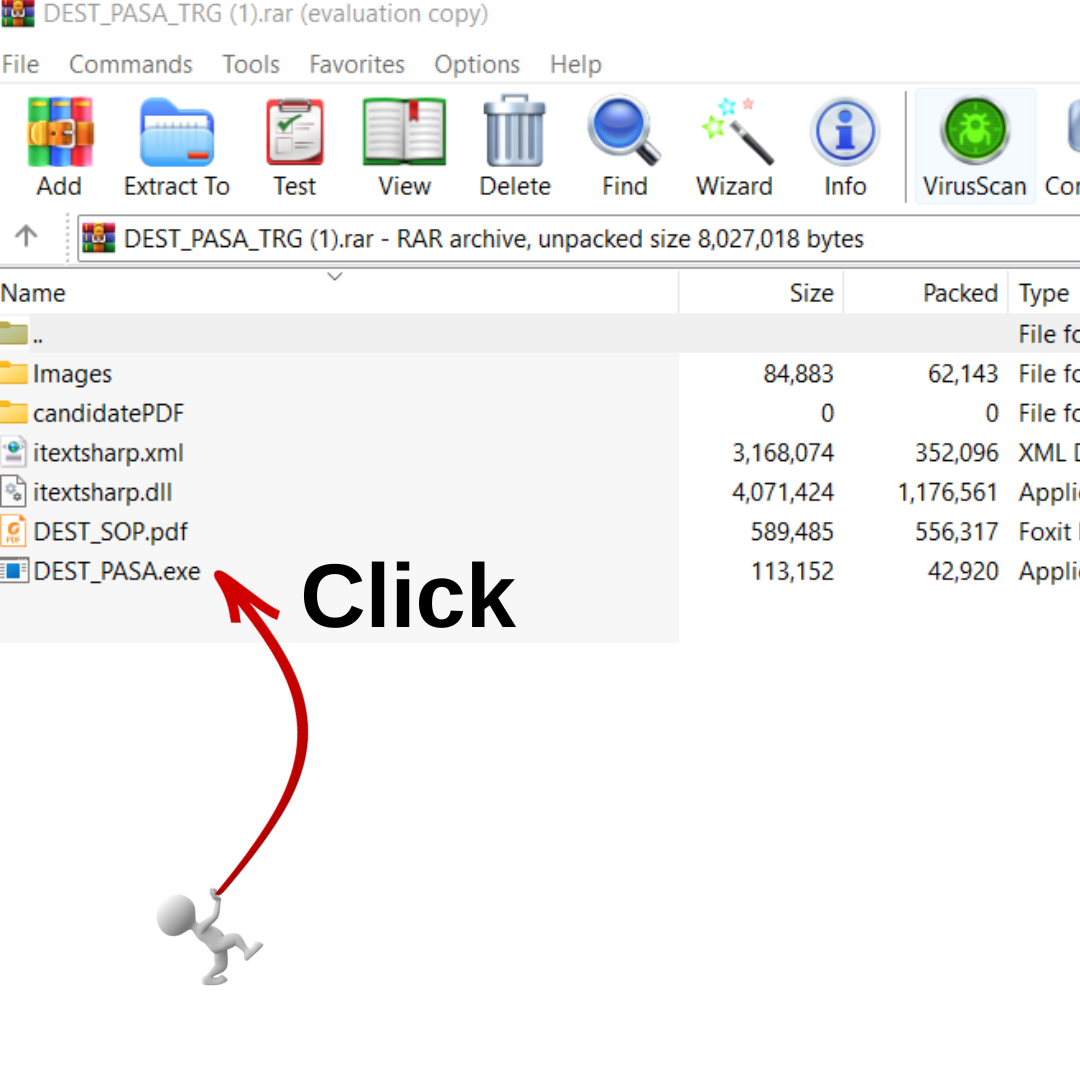
- Right-click the file and choose "Extract Here" in WinRAR or 7-Zip.
- Open the new folder and read DEST_SOP.pdf first. It explains the screens.
- Double-click the .exe file to start practising.
What are the official DEST rules?
| Exam | Time | Text to type | Pass mark (out of 25) |
|---|---|---|---|
| GDS / MTS to Postman or Mail Guard | 15 minutes | 600 key depressions (±5%) | 60% General and OBC/EWS (15 marks); 50% SC/ST and PwD (12.5 marks) |
| PA/SA (LDCE) | 15 minutes | 800 key depressions (±5%), as per the 2022 Directorate letter | 60% General and OBC/EWS; 50% SC/ST and PwD |
The Postman row is from India Post's 2026 exam notices. For PA/SA, the 2026 notice points to a later Directorate letter (19.12.2022) for DEST rules, so check your own circle's notice. The typing test is held on a separate day, only for candidates who pass the written papers.
An older version of this page gave pass marks of 50%, 45% and 40%. Those are not the current figures. Use the table above.
What do I need to know about the tool's screen?
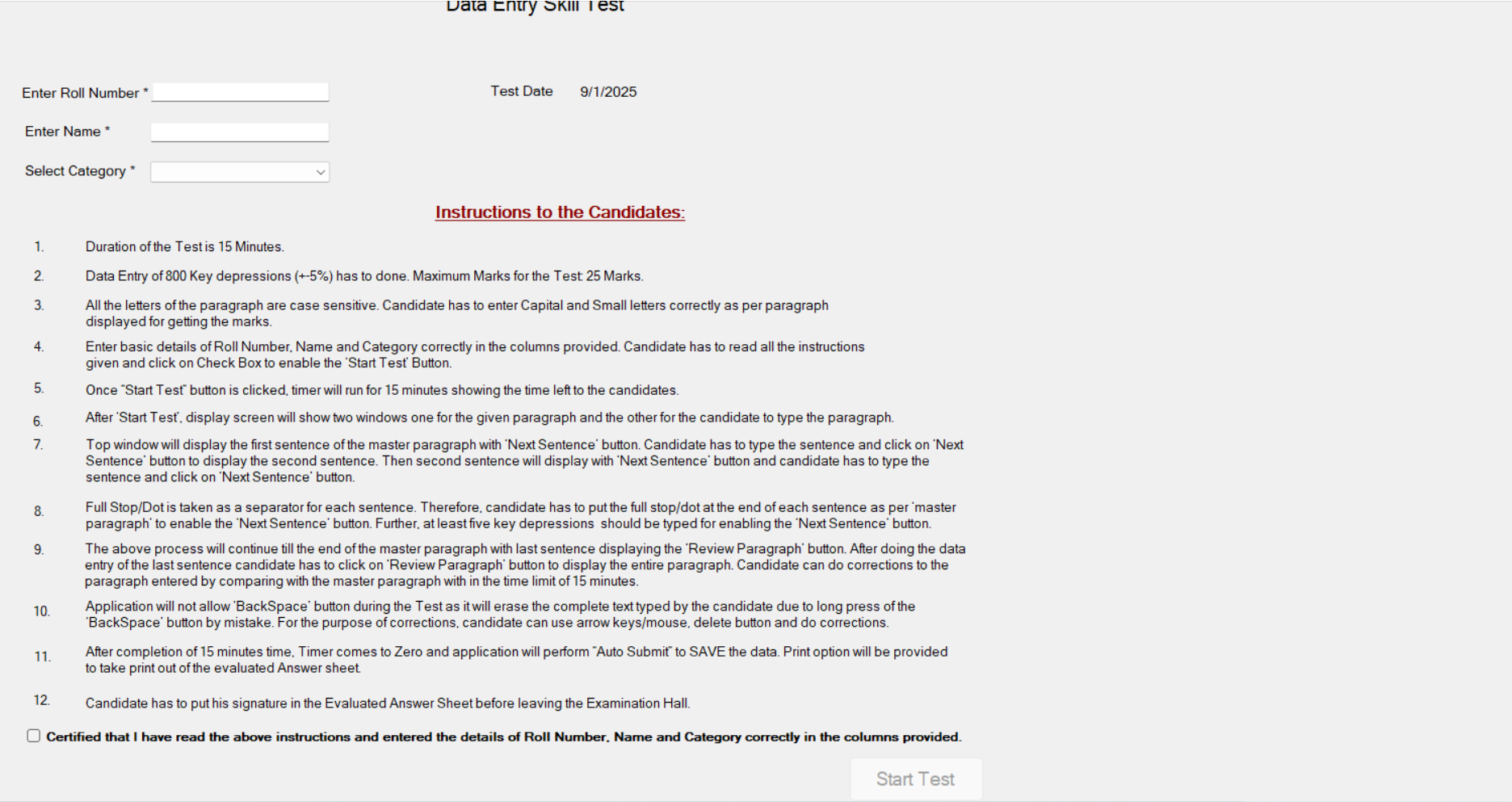
These rules are printed on the tool's own instruction screen:
- Case sensitive. Capital and small letters must match the passage exactly.
- One sentence at a time. The top window shows a sentence. Type it, then click "Next Sentence". Type the full stop at the end of each sentence, or the button stays locked.
- Backspace is blocked. Holding Backspace could erase all your text, so the tool turns it off. Fix mistakes with the arrow keys, the mouse and the Delete key.
- Review at the end. After the last sentence, "Review Paragraph" shows your full text so you can correct it within the 15 minutes.
- Auto submit. When the timer reaches zero, your answer is saved and you can print the evaluated sheet.
How should I practise?
- Practise with your hands on the home row, not by looking at the keys. Accuracy matters more than speed at first.
- Do one full 15-minute test a day and keep the printed sheets to see your progress.
- Get used to fixing errors without Backspace. This trips up many candidates on exam day.
Preparing for the Postman, Mail Guard or PA/SA exam? The typing test only comes after the written papers. VV Academy runs coaching for Postman / Mail Guard / MTS and PA/SA. Not sure which exam you can write? Read GDS to MTS, Postman and PA/SA: the promotion ladder, or ask us on WhatsApp.