Data Entry / Typing Practice Tool for PA/SA & Postman Exams – Download & Setup Guide
Procedure to download and unzip the application
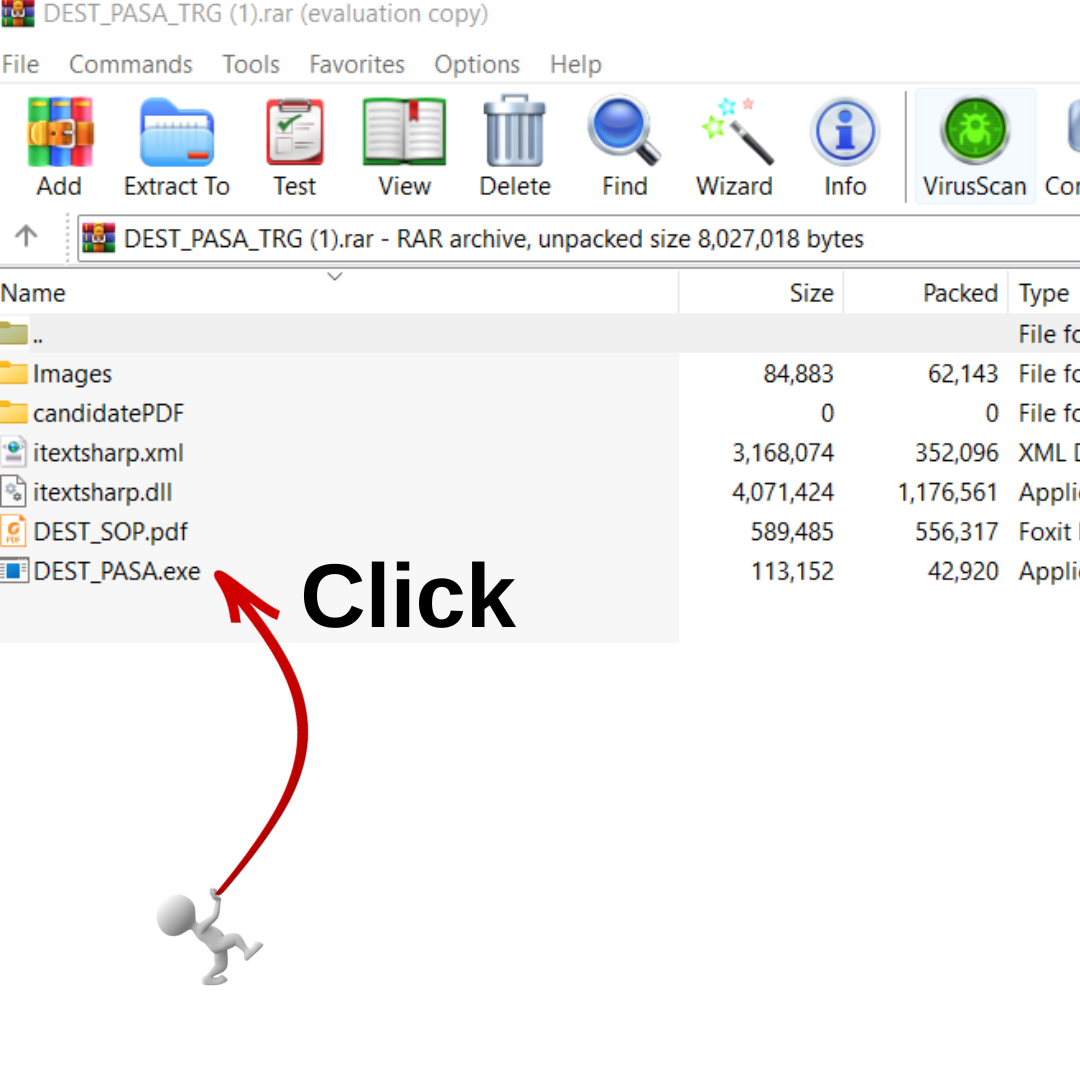
- Download the RAR file from the above link
- Unzip this RAR file using Winrar or 7-Zip tools
- This will extract folders and file
- Go through the SOP and proceed to practice DEST exam
Note: The tool works only on Desktop or Laptop. It cannot run on mobile phones or tablets.
Next Steps for Students
Locate the File
It should be on the Desktop (as shown) or in the Downloads folder.
Right-Click on the RAR File
Choose “Extract Here” or “Extract to DEST_PASA…” (depending on your extraction tool).
Wait for Extraction
A new folder will appear with all necessary files.
Open the SOP
Read instructions before running the application.
Run the Practice Tool
Double-click the
.exefile inside the extracted folder to start.
Data Entry Skill Test (DEST) – Quick Guide for Students
1. Purpose of DEST
- Conducted for candidates who qualified in Paper I & Paper II of LDCE for PA/SA recruitment.
- Tests your typing speed & accuracy in 15 minutes.
2. Key Features
- Offline Application – No internet required.
- Works only on Desktop/Laptop.
- Timer – 15 minutes.
- Key Depressions – 600 (±5%) for 25 marks.
- Case Sensitive – Type exactly as shown (Capital/Small letters).
3. Qualifying Marks
- General: 50% (12.5 marks)
- OBC/EWS: 45% (11.25 marks)
- SC/ST: 40% (10 marks)
- PWD: 40% (10 marks)
4. How to Start the Test
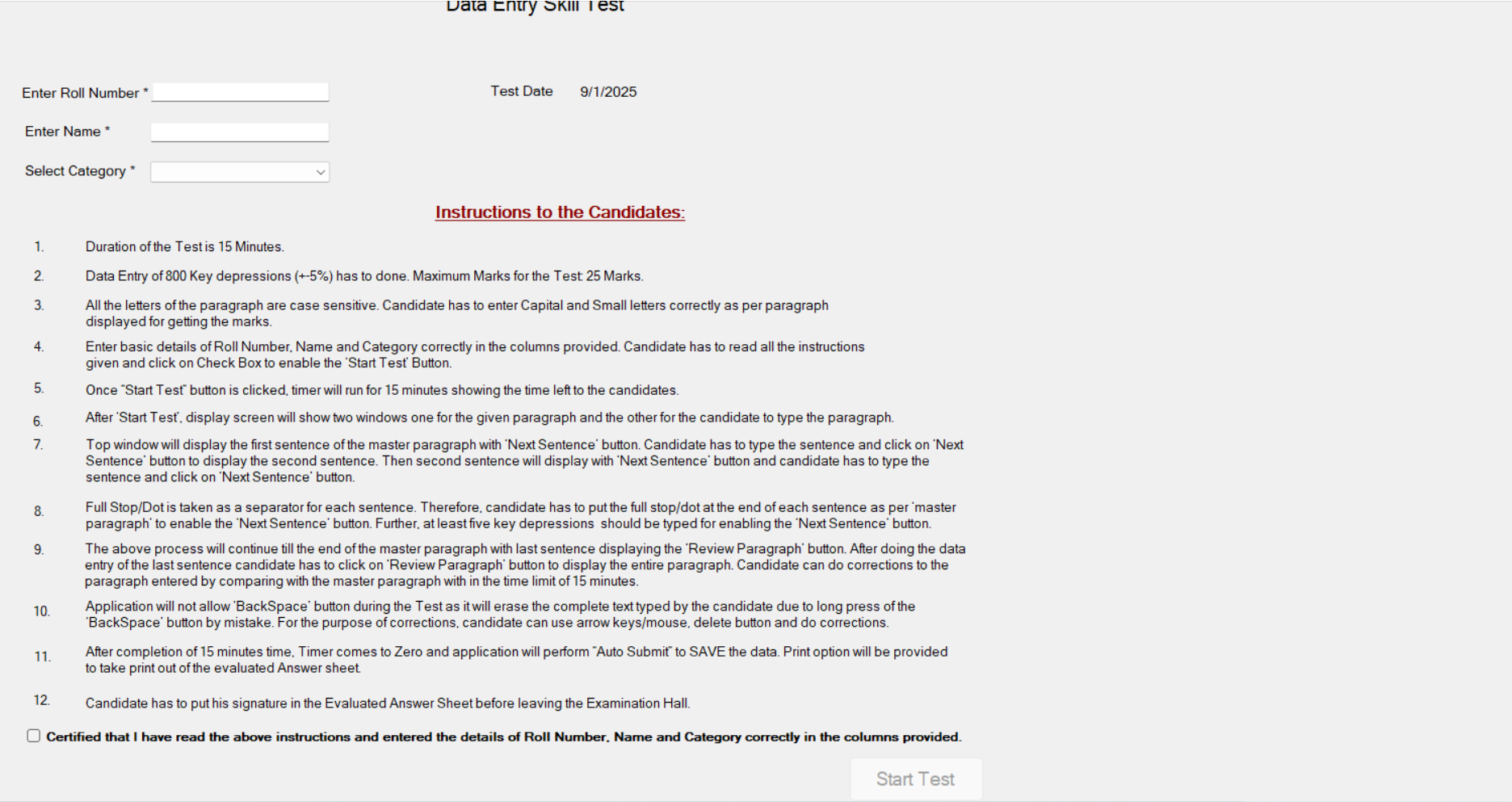
- Open the DEST application on your desktop.
- Enter your Roll Number, Name & Community correctly.
- Read instructions carefully & tick the checkbox.
- Click Start Test to begin (timer starts immediately).
5. Typing Process
- Two windows appear:
- Top window: Sentence from the master paragraph.
- Bottom window: Type the sentence.
- After typing:
- Put a full stop (dot) at the end of each sentence.
- Click Next Sentence to move ahead.
- At least 5 key presses are required for each sentence.
- After last sentence:
- Click Review Paragraph to see full text.
- Correct errors using arrow keys, mouse & delete.
6. Restrictions
- Backspace button is disabled to avoid accidental deletion.
- Extra spaces, tab, enter keys are ignored in evaluation.
7. Submission
- Test auto-submits when 15 minutes are over.
- Evaluated Answer Sheet (PDF) is generated with:
- Name, Roll Number, Community, Date/Time.
- Marks and percentage scored.
- Printout is taken & signed by Candidate & Supervisor before leaving.
8. Evaluation Logic
- System checks each word typed against master paragraph.
- Correctly matched words get marks.
- Extra/unmatched words are ignored (no negative marking).

Enter your Roll Number (any ) not Exact
And Name
And select your category (GEN/EWS/OBC/SC/ST/PWD)
SELECT THE BUTTON AND FINNALLY CLICK START TEST
Certified that I have read the above instructions and entered the details of Roll Number, Name and Category correctly in the columns provided.
Start Test
RRB Group D Coaching – VV Academy Vijayawada
RRB Group D Coaching RRB Group D Exam – Syllabus,...
Read Moressc-gd-constable-2026-notification-vv-academy
SSC GD Constable 2026 Notification – 25,487 Vacancies | V...
Read Moreజాతీయ రాజ్యాంగ దినోత్సవం
రాజ్యాంగ దినోత్సవం: చరిత్ర, రూపకల్పన, మరియు ప్రాముఖ్యతపై సమగ్ర విశ్లేషణ ఈ వ్యాసం...
Read Morerrb je 2025
RRB JE 2025 — Notification released for 2,569 vacancies Complete...
Read MoreComments
comments